Local-first · scan receipts & invoices on your phone, track everything on your PC

Track your budget, wealth & business finances —
in one app you own.

Scan receipts and invoices, itemize purchases, attach documents to transactions, and keep personal and business finances organized — on your PC and phone. Local-first & private — your financial data stays on your device.

✓ Runs locally  ·  ✓ Code-signed (Windows)  ·  ✓ Mobile receipt & invoice scanning  ·  ✓ Optional cloud sync

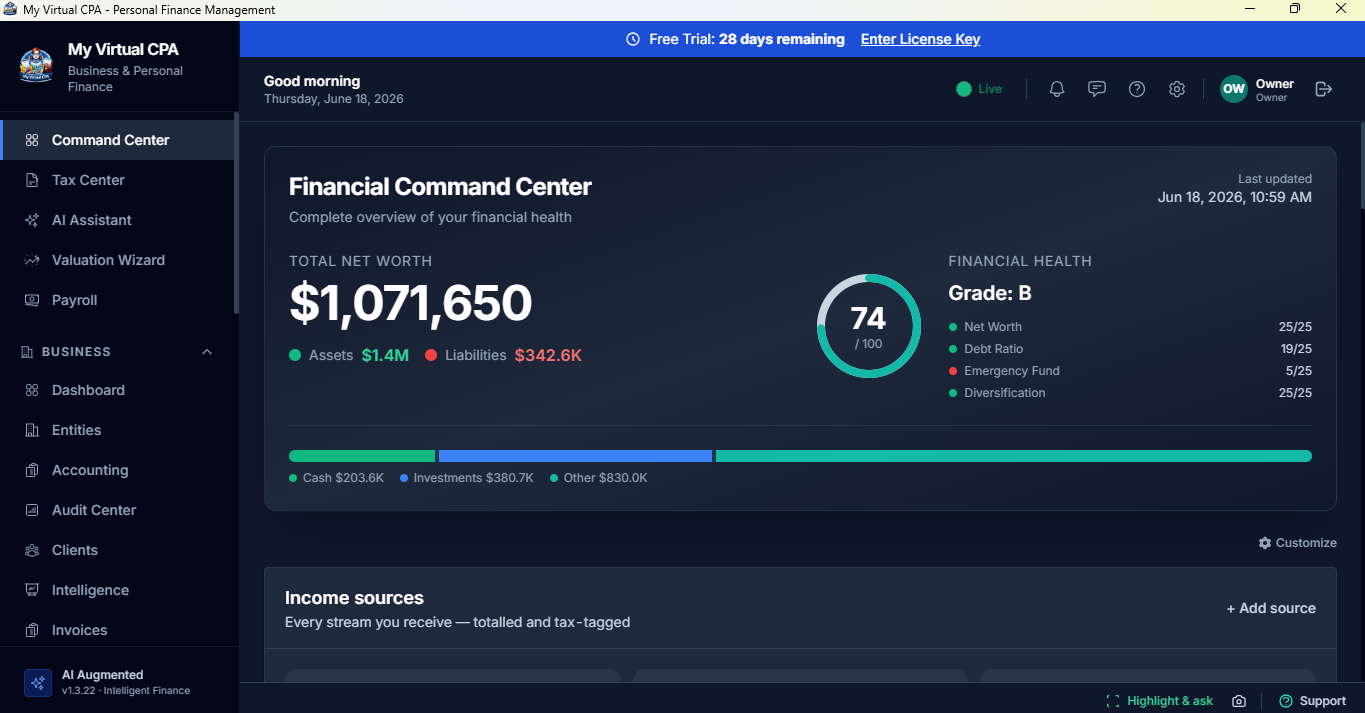
My Virtual CPA Command Center — total net worth, financial health grade, cash flow, and income sources

"I scan a receipt on my phone and it's already itemized and attached to the right transaction on my PC. Personal and business finally stay separate — and my year-end records are clean." — Beta tester, small-business owner  ·  replace with a real testimonial before launch

The problem

Manual financial tracking is painful

Receipts pile up, card transactions lack detail, and personal and business spending get mixed together. By year-end you're digging through statements and receipts just to hand clean records to your CPA or bookkeeper.

Receipts get lost· Itemizing by hand takes hours· Personal & business get mixed· Year-end cleanup is stressful
One app, everything

Everything in one place — on your PC and phone

Scan receipts on mobile, track everything on your PC, and ask a built-in AI assistant about your own numbers.

Mobile receipt & invoice scanner

Snap a receipt or invoice on your phone; it itemizes the purchase and syncs to your PC app automatically.

Built-in AI + advanced search

Ask your finances in plain English and find any transaction, receipt, or figure in seconds — local AI, your data stays put.

Bank & API connections

Optional bank sync (Plaid) and API connections pull transactions in automatically — or import by CSV. Your choice.

Command Center

Budgets, spending, net worth, cash flow, and business health at a glance.

Wealth & Portfolio

Stocks, ETFs, crypto, precious metals, real estate, dividends, and net-worth history.

Personal + business modes

Keep personal and business finances separate, or view both together — one app, your way.

Year-end organization

Clean income, expense, and receipt summaries plus CPA-ready report exports for your accountant or bookkeeper.

Invoicing & e-signatures

Create, send, and track invoices, and send documents for legally binding e-signatures — right from the app.

Payroll & accounting

Pay runs, retirement contributions, general ledger, and month-end close for your business.

Receipt intelligence

Scan it once. Track it everywhere.

Instead of typing every line from a receipt or invoice, scan it with the mobile app. My Virtual CPA reads it, itemizes the purchase, and helps categorize the expense — then attaches it to the matching debit, credit, or bank transaction on your PC.

1 · Scan on your phone

Snap a photo of any receipt or invoice. The mobile app captures merchant, date, totals, taxes, and line items.

2 · Auto-itemize & categorize

The purchase is itemized and categorized automatically — no manual data entry, no lost detail.

3 · Attach to the transaction

It syncs to your PC app and attaches to the matching card or bank transaction, so your records stay complete.

Example: Bought 42 items at Costco? Scan the receipt once. My Virtual CPA itemizes the purchase, categorizes the line items, and lets you attach the receipt to the matching card transaction — handy for households, contractors, consultants, and business owners who want more detail than a basic card charge.
Why it's different

Own it. Keep it private. Get it done.

Private by default

Local-first: your data lives on your computer and works offline. Nothing is sent to our servers unless you turn on Cloud Sync.

Local-first & private

Your financial data lives on your computer — not someone else's cloud. Back it up anytime.

Built by an owner

Made by an S-corp solopreneur who does his own books and taxes — because nothing else did the whole job.

Personal, business, or both

Keep them separate — or view them together

Many solo owners and small-business users manage both personal and business finances. My Virtual CPA lets you run one without the other, or keep both — separate when you want, combined when you need the full picture.

Personal

Budgets, spending, wealth, receipts, assets, liabilities, and net worth for individuals and families.

Business

Business income, expenses, receipts, invoices, vendor/customer notes, and reports — without a complex accounting system.

Personal + business

Track both in one place: keep records separate with a combined dashboard, and cleaner year-end organization.

Pricing

One subscription. Everything included.

Personal and business, the AI assistant, cloud sync, and the mobile app — all in one plan. Start with a 30-day free trial; cancel anytime.

Monthly

$19 /month

Everything, billed monthly

  • Personal & business finances
  • Receipts, invoices & reports
  • Wealth, portfolio & taxes
  • Cloud Sync + mobile app
or download the trial →

Enterprise

Custom

For organizations with specific needs

  • Everything in Annual
  • Volume licensing
  • Dedicated support & onboarding
  • SLA & custom integrations
Contact sales

30-day free trial · cancel anytime · secure checkout

After your free trial, your plan begins and your card is charged. You download the app for Windows and sign in to activate. Payments, taxes, and refunds are handled by Lemon Squeezy, our authorized reseller and Merchant of Record.

Try it free

Download the free 30-day trial

Full-featured. No credit card. Your data never leaves your computer.

Code-signed — no "unknown publisher" warnings. macOS coming soon.

FAQ

Questions, answered

How does billing work?

My Virtual CPA is a subscription: $19/month or $190/year (two months free). Everything is included — personal and business, the AI assistant, Cloud Sync, e-signatures, and the mobile app. Start with a 30-day free trial; if you don't cancel before it ends, your plan begins. You can cancel anytime to stop future charges.

Where is my data stored?

Locally, on your own computer, in a private database. Nothing is sent to our servers unless you opt into Cloud Sync. You can back up and restore anytime.

Do I need to be an accountant?

No. There's a guided tour when you first open the app, an AI "App Help" mode that answers how-to questions, and a free 30-day trial to explore at your own pace.

Which platforms are supported?

Windows today — the installer is code-signed, so you won't get "unknown publisher" warnings. macOS is coming soon. There's also a companion Android app.

Is this a substitute for a CPA?

No — it organizes your finances and produces CPA-ready reports and estimates, but you should review filings with a licensed professional. It's the tool that makes their job (and yours) far easier.

How do I get the app after I subscribe?

Download the app for Windows and sign in with your account to activate your subscription — no shipping, no waiting. You can also download the free trial first and subscribe from inside the app or this site. Need help? Email support@eugenius.ai.

Who processes payments?

Checkout, sales tax/VAT, and refunds are handled securely by Lemon Squeezy, our authorized reseller and Merchant of Record. We never see or store your card details.

What's your refund policy?

You get a full 30-day free trial, so you can evaluate everything before paying. After that, cancel anytime to stop future charges. See our Refund Policy.